Disclaimer: this post only covers how to reach services in mainland China through a proxy while living overseas. It has nothing to do with getting around the firewall from inside mainland China. Please follow the laws where you live.
Singapore’s broadband sits near the top of the global speed rankings year after year, and gigabit fiber is just the entry-level plan. Yet anyone who has lived in SG for a while has probably been through these:
- You want to catch up on an obscure Bilibili video one evening, and the 4K buffer bar moves slower than playback. 2x speed? Don’t even think about it.
- You launch a game on a Chinese server, and the ping in the top-right corner sits above 200 and never comes down.
- Some Chinese websites simply won’t load, and the ones that do squeeze out their images one by one, like a flashback to the 2G era.
A gigabit pipe, and it behaves like this? This post covers two things: what’s actually wrong with the routes between mainland China and the rest of the world, and how I worked around it.
Physically, It Shouldn’t Be This Slow
Light in fiber travels at roughly two-thirds of its speed in a vacuum, so latency is mostly a function of distance. Shanghai to the US West Coast is about 10,000 km as the crow flies, which puts the theoretical round-trip floor a little over 100ms. Real routes follow submarine cables, so the best of them manage around 130ms, while ordinary routes typically land around 160ms. By the same rough ratio, a Shanghai–Tokyo round trip should be around 40ms, and Shenzhen or Shanghai to Singapore about 50ms.
So let’s grab two ordinary servers, one in Singapore and one in Japan, and see how they actually do when reaching China:
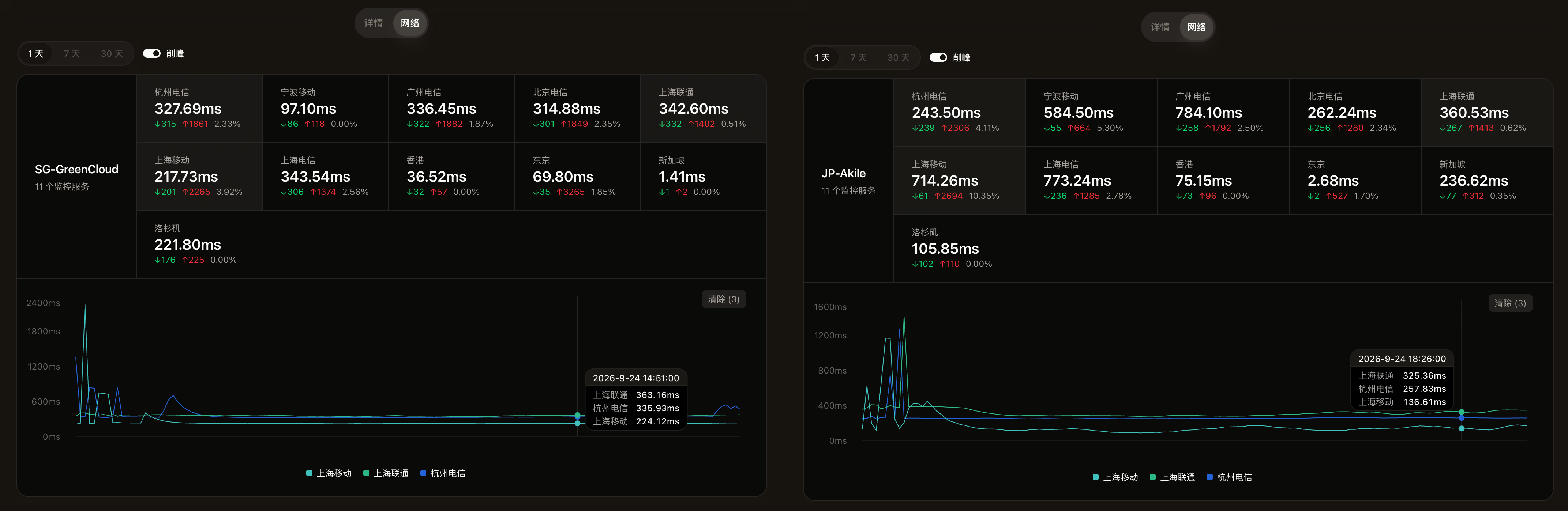
Is that right?
Maybe data-center networks have their own issues. What about a real Singapore home broadband connection? Here are the results from a local ISP (script: bash <(curl -Ls Check.Place)):
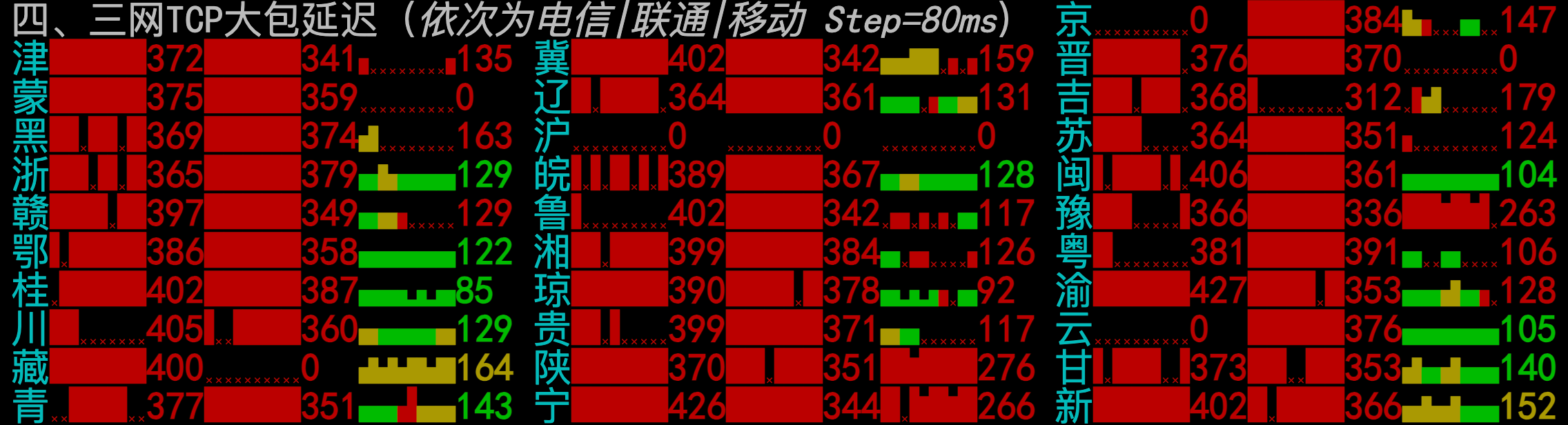
A screen full of red. Telecom and Unicom are wiped out almost everywhere; Mobile does a little better, but it’s still nowhere near the theoretical numbers.
Your Packets Are Touring Europe and America
For once, you can’t blame all of this on Fang Binxing, the “father of the Great Firewall.” The usual understanding is that internet traffic never takes the physically shortest path; it takes the economically cheapest one.
Network interconnection in Asia-Pacific is notoriously expensive. For all sorts of reasons, “Singapore → US → China” often costs less in total than a direct “Singapore → China” link, so the traffic dutifully takes the long way round. Singapore to the US West Coast alone is around 170ms; bounce back from there into China, and a total above 300ms is no surprise.
And the detour isn’t necessarily through the US. BGP routes change dynamically, and the outbound and return paths may not even be the same. Here are NextTrace results from a SingTel phone hotspot to Shanghai, and from StarHub home broadband to Beijing:
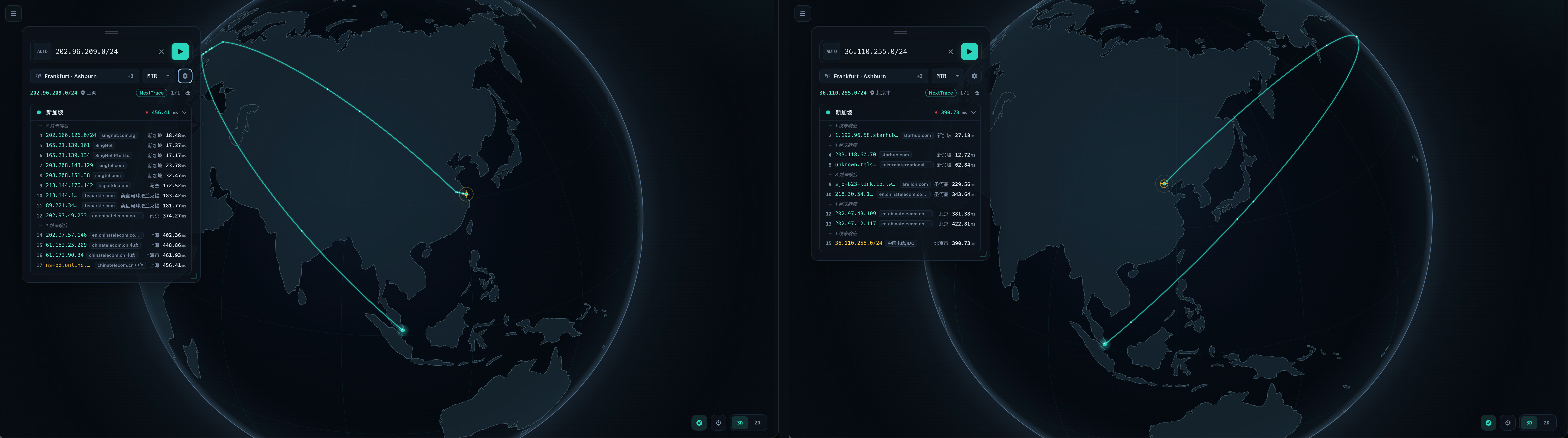
“I’ve been doing networking overseas for years, and I know exactly how packets travel. A TCP request from Singapore to Shanghai first flies to Marseille, then Frankfurt, and finally comes home through Nanjing. Switch carriers and head for Beijing, and it takes a lap around the Pacific via San Jose. It takes me half a minute just to read out all those hops, and these packets finish their all-expenses-paid world tour in 400 milliseconds. 400 milliseconds! With a 400ms ping, you could play on a Chinese server for ten years and never land a single ultimate!”
The World Is Within Reach (For a Fee)
At this point you might raise your hand: “Hold on, I’ve used a ‘ladder’ (a VPN) before, and nodes in these regions weren’t nearly that slow?”
Because miracles and magic aren’t free. Carriers do offer pay-more options: both ends of the link can buy pricier optimized routes, or even dedicated lines. These are usually reserved for big enterprise customers, with the odd exception — Shanghai Unicom, for example, once let individual subscribers pay extra for its international premium network.
If paying more on the China side isn’t practical (we don’t control the servers in China, after all), you can pay on the overseas side instead: buy a server connected to optimized routes and run a proxy node on it. The example in this post is a “China-optimized” Singapore VPS I bought from GreenCloud:
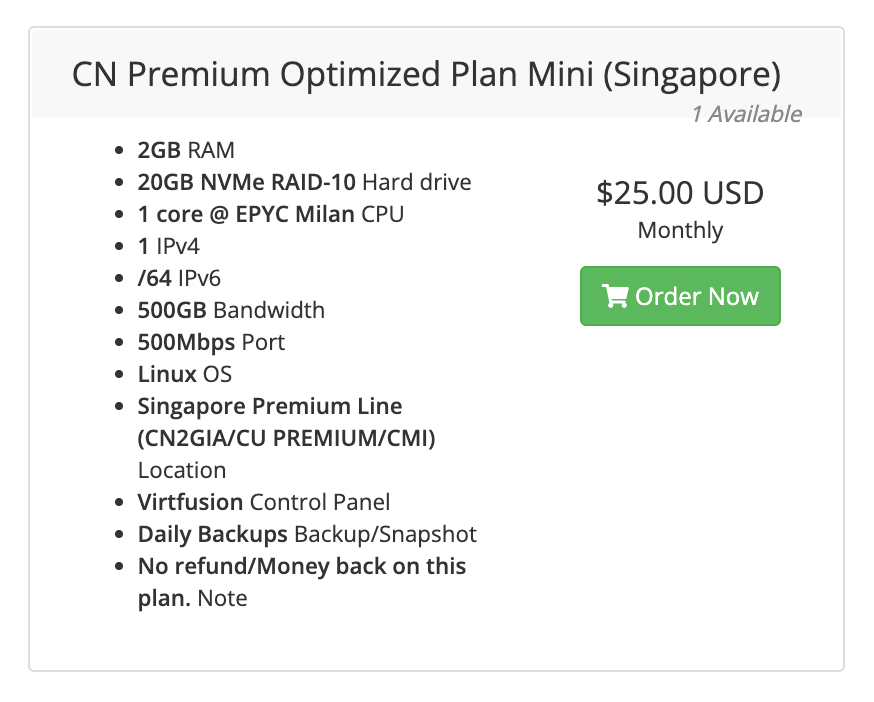
The vendor claims it’s connected to the premium routes of all three carriers. If CN2 GIA, 9929, and CMIN2 are just a string of code names to you, this primer on mainland network routes (in Chinese) is a good read. As for how well it actually works, run the same script again:
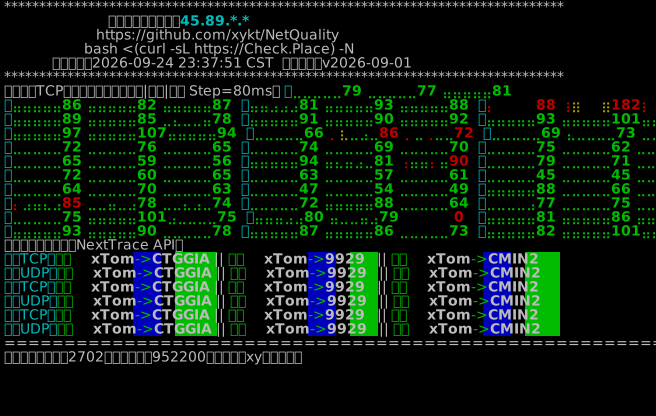
From a screen full of red to a sea of green: that’s the color of money. If you want to try it too, feel free to use my referral link — I get a small kickback.
Before We Start
How to set up a node on the VPS and connect to it locally is out of scope here. There are countless tutorials online, and these days any AI agent can walk you through it step by step.
My one recommendation: use Sublink Works to generate a subscription link for your node, since we’ll use its custom-rule feature later. Of course, you could also just hand this post to an agent and have it produce a complete China-acceleration config for you. As for why I still do it by hand: this workflow was built in the pre-agent era, and I can’t be bothered to tear it down and start over.
Once the node is ready, you can connect from your computer or from your router. I recommend the router: configure it once and the whole home benefits, instead of fiddling with every device separately. The examples below use OpenWrt + OpenClash; if you use a client like Clash Verge Rev or Clash Meta, the approach is exactly the same.
Games: From 300ms to 80ms
The simplest, bluntest first step: select the optimized-route node and enable TUN mode + Global mode.
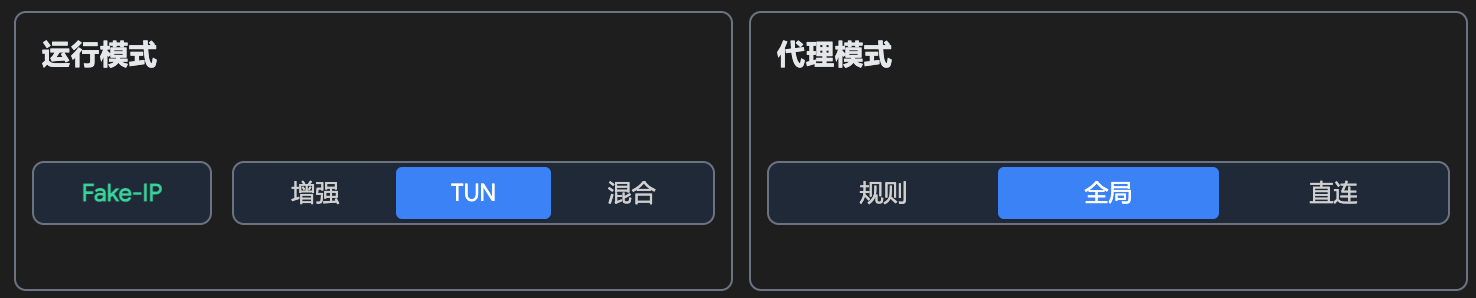
Relaunch your game and latency should drop straight into a reasonable range: Genshin Impact went from 200ms to 80ms, and Wuthering Waves from 340ms to 100ms. For non-competitive games, that’s plenty. Want it lower still? Either pay more, or physically move back to China.

Note that UDP must be captured, and the easiest way to do that is TUN. Games mostly use UDP, while an ordinary system proxy only handles TCP. Without TUN, game traffic slips right past the proxy untouched and carries on touring Europe.
Don’t Route the Whole Household Through the VPS
Global mode has an obvious problem, though: all of your home’s traffic goes through the VPS. Reaching non-Chinese sites now takes an extra, pointless hop, which only slows things down. Worse, the VPS has a traffic quota. On mine, proxied traffic is counted once coming into the VPS and once going out, so the advertised 500GB only covers about 250GB of proxying.
So Rule mode is the better choice: set every other group to DIRECT (and while you’re at it, set the ad-blocking group to REJECT to get rid of some ads), and point only the “国内服务” (China Services) group at the optimized node.

Finer Still: Accelerate Only the Games
If you only want to speed up games, without letting other Chinese traffic eat into the VPS quota, add a custom rule group in Sublink Works:
[
  {
    "name": "🎮 国内游戏",
    "site": "",
    "ip": "",
    "domain_suffix": "yuanshen.com, genshinimpact.com, bhsr.com, starrails.com, honkaistarrail.com, juequling.com, zenlesszonezero.com, aki-game.com, aki-game2.com, kurobbs.com, kurogames.com, aki-game.net, aki-game2.net, kurogame-service.com, kurogame.net, kurogame.com, kurogame.xyz, carystudio.com, kuropage.com, kurogames.net, mihoyo.com, miyoushe.com, mhystatic.com, mhyurl.cn, mihayo.com, mihayou.com, mihoyocg.com, mihoyogift.com, mihoyomall.com, hoyoverse.com, hoyolab.com, hoyo.link, n0vadesktop.com, hypergryph.com",
    "domain_keyword": "",
    "ip_cidr": "",
    "protocol": ""
  }
]
(The list holds domains from miHoYo, Kuro Games, Hypergryph, and others. Swap in whatever games you play.)
Domains alone aren’t enough: the actual match connections in games often go straight to an IP without any DNS lookup. So also add an override rule in OpenClash:
rules:
- AND,((OR,((RULE-SET,cn-ip),(RULE-SET,cn))),(NETWORK,UDP)),🎮 国内游戏
What it says: any traffic whose destination is in mainland China and that uses UDP goes into the “国内游戏” (China Games) group. Point that group at the optimized node, and you’re done.
Whichever approach you choose, you can check the connection list to confirm the game’s connections are now going through the proxy:

This rule may also end up proxying some QUIC traffic and other UDP traffic, such as video calls. But OpenClash can disable QUIC on its own, and other UDP uses generally don’t consume much traffic, so I’ve left it alone for now; you can refine the rules to suit your needs.
Bilibili Is Still Laggy
Games are sorted, but Bilibili is still laggy.
Going by feel, Bilibili’s overseas CDN is pretty bad: 4K on obscure videos is nearly unwatchable. Overseas, Bilibili mainly uses Akamai’s CDN, and my guess is that the problem lies in origin fetches for less popular videos: popular videos are long since cached on overseas edge nodes, while obscure ones have to be slowly pulled from China every time.
That means simply switching the “哔哩哔哩” (Bilibili) group to the optimized node doesn’t help — the node’s exit is still a Singapore IP, so Bilibili still assigns you an overseas CDN. What we really want is for requests to hit the domestic CDN directly.
I’ve tried the following two options, and both work to a degree:
- Userscript: Bilibili Video CDN Switcher
- Chrome extension: TWSG 影片加速 for Bilibili (unofficial)
Both switch most videos over to domestic CDNs. On top of that, point the Bilibili group in your rules at the optimized node, and loading gets faster still.
FAQ
Q: I don’t understand any of these configs…
Give your requirements and node details to a capable enough AI agent, and it will most likely write a cleaner Clash config than the one in this post.
Q: I want to watch region-locked content as a mainland user…
That’s fairly risky, and I don’t recommend it. If you happen to have a server in China, ask an AI about it, but make sure you follow the relevant laws and regulations.
Q: I want to speed up other websites too…
If you’re not using the built-in “国内服务” (China Services) group, just add the domains to the override rules.
Q: Does this count as “climbing the wall”?
No. This is completely legal in Singapore, everything happens outside China, and there is no attempt whatsoever to get around the firewall.
Q: Where can I find a VPS with China-optimized routes?
Besides the referral link above, you can check reviews and route information on DigVPS.