Device: Kindle Paperwhite 12th gen Signature Edition, jailbroken with Véra, running KOReader. Firmware
5.19.6when the trouble started,5.20.1.0.2by the time it was fixed.Repair scripts and technical notes: t0saki/kindle-cc-db-repair
Warning: this post involves jailbreaking, deleting a system database as root, and calling undocumented system interfaces. It is a record of one device, not an official procedure. Back up first, and read “Before you start” before touching anything.
For several months my Kindle was half broken. Personal documents sent via Send to Kindle often never arrived. Automatic sync basically didn’t work, so I had to trigger it by hand. “Sync to Furthest Page Read” failed every time. And for personal documents that were already downloaded, the long-press menu had no “Remove from Device”, only “Delete Permanently”.
On the same Wi-Fi, the Kindle app on my phone worked perfectly. I went through Reddit and Bookfere (a Chinese Kindle community), found plenty of similar complaints, and concluded this was just one of Amazon’s chronic problems. At some point I also whitelisted Kindle’s sync domains in my router’s ad blocker. It made no difference.
Then I started planning an exit: move all reading to KOReader, manage the library through a web UI, transfer books over OPDS, and stop relying on Amazon’s sync altogether. The plan was complete. I just never got around to it.
On the evening of November 11, after yet another failed sync, something finally occurred to me: this Kindle had been jailbroken for ages. I had root. I could just read the logs. It took me several months to think of that.
From a little after 10 p.m. until 3 a.m., I had Claude Code (the “Agent” below) SSH into the router and then into the Kindle. The conclusion: Amazon’s servers returned HTTP 200 every single time, and the home network was fine. What was broken was the Kindle’s local library database, /var/local/cc.db. A single sync produced 398 SQL logic errors. Deleting it and letting the system rebuild it fixed sync. Then, using the system’s own download interface, I re-registered the “Downloaded” state of 1,166 books without re-downloading any of their content.
If you got here by searching for the symptoms, the first two sections are all you need. The third is the full story of that night, including half an hour wasted on the router, an unplanned firmware upgrade, and how 11 GB of manga I had deleted long ago came back.
1. Match the symptoms: why it looks like a network problem
If it’s the same failure, you’ll see all of these, or at least several of them:
| What you see in the UI | What actually happens |
|---|---|
| New documents sent by email / Send to Kindle never show up, not even in search | The cloud already delivered the list; writing it into the local cc.db fails, so the new library never gets the entries |
| ”Sync to Furthest Page Read” fails | A side effect of the same failure; it works again after the rebuild (I didn’t dig into exactly which step it gets stuck on) |
| Long-pressing a downloaded personal document offers only “Delete Permanently”, no “Remove from Device” | The local file can’t be linked to its cloud record, so the system treats it as a sideloaded file |
| You delete a book, the space is freed, but it still counts as “Downloaded” | The file was deleted; the database update that should follow failed, so the record stays |
| On the same Wi-Fi, the Kindle app on your phone works perfectly | The phone app uses the phone’s own database. It only proves your account and the cloud are fine |
The last row is what makes this so misleading. Phone fine, Kindle broken: anyone would suspect the network first.
If your Kindle is jailbroken, you can confirm the diagnosis in half a minute. Tap “Sync & Check for Items” once in the native UI, then run (or just run sh scripts/diagnose.sh from the repo):
grep -c 'SQL logic error' /var/log/messages
grep 'ProcessArchiveItemFailed' /var/log/messages | tail -1
If you see these two kinds of errors, you can stop checking your router and DNS:
java[...]: E rc:lwsf:http_code=400,handler=process_/change,... /usr/lib/ccat/change.lua:1969: {"http_status_code":400,"sqlite3_msg":"SQL logic error","sqlite3_code":1}
java[...]: E ... /usr/lib/ccat/change.lua:2321: {"sqlite3_msg":"SQL logic error","sqlite3_code":1}
archive[...]: E archive:ProcessArchiveItemFailed:errorMsg=nullResponse,cdeKey=<private>,cdeType=PDOC,...,action=insert:
archive[...]: W archive:ProcessArchivedItemsUpdateCCatFailed:reason=updateCCATFailed
To see how one error causes so many symptoms, you need to know that current Kindles have two library databases:
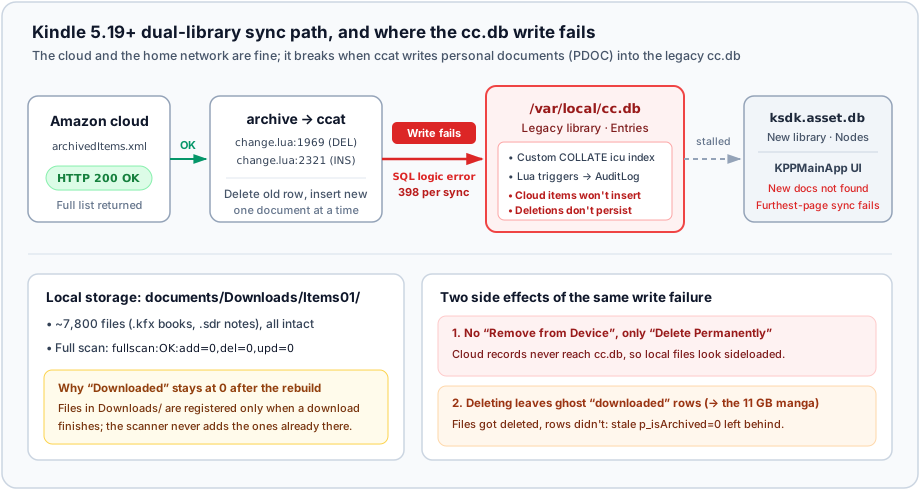
/var/local/cc.db(the legacy library): owned byccat, a Lua service running inside the Java framework. In its coreEntriestable, a cloud entry (p_isArchived=1) and a downloaded local copy (p_isArchived=0, withp_locationpointing at the file) each get their own row./var/local/ksdk.asset.db(the new library): owned by the new library UI,KPPMainApp. The books on screen and their “Downloaded” badges come from itsNodestable (theDOWNLOAD_STATEcolumn).
The two are kept in step by a chain of triggers on cc.db: whenever Entries changes, a trigger calls functions in /usr/lib/ccat/sql_functions.lua, which write the change into CatalogChanges and AuditLog, and the new library follows that log.
During a sync, the archive process pulls archivedItems.xml from Amazon (HTTP 200, complete content), and for each personal document ccat first deletes the old row by UUID (change.lua:1969), then inserts a new one (change.lua:2321). On my broken cc.db, both steps failed with SQL logic error: in one sync, 36 deletes and 362 inserts failed. Nothing could be written at the source, so nothing flowed down the chain, and naturally nothing showed up in the UI.
2. How to fix it
Before you start
This section involves: jailbreaking, deleting a system database as root, rebooting, and calling Amazon’s undocumented internal interfaces in bulk. Any of these can go wrong, and several did go wrong for me; section 3 has the details.
- This is a record of one device. Model and firmware are listed at the top. On a different model or firmware, file paths, interface names and database schemas may differ, and Amazon can change any of them at any time.
- Back up first, and keep two copies. One on the device, one on a computer, and make sure the computer copy is complete before going any further. At minimum, back up
cc.dbandksdk.asset.dbunder/var/local/(backup.shdoes this). Copying important books and their adjacent.sdrfolders (notes and reading progress) separately is also a good idea. - Rebuilding the database loses things. The “Downloaded” state will definitely be lost; below I explain how to get it back. Collections that existed only locally and never synced to the cloud may be lost too; I didn’t compare everything item by item before and after.
- Jailbreaking carries its own risks. It can fail, it may affect your warranty, and a system update can take it away.
- The scripts haven’t been fully retested. The
scripts/in the repo were assembled afterwards from the commands actually run that night. The logic is the same, but I haven’t run the cleaned-up versions end to end on a device again. Read them before running them, and try any bulk operation on a single book first. - The worst case is a factory reset and re-downloading everything. Only start if you can live with that.
The repo is MIT-licensed and comes with no warranty. Any data loss or device trouble from following along is your own responsibility.
1. Not jailbroken
The database lives under /var/local/, which isn’t visible over USB and can’t be touched without root. My scripts can’t help you here. You have two options.
Factory reset (not verified by me). A reset wipes and rebuilds the database, so in principle it should fix this. The cost is that everything on the device is erased and must be downloaded again, so copy off anything important first.
Reports on whether it works are mixed. In the comments of Bookfere’s post on firmware 5.18.5.0.1 (in Chinese), someone in October 2025 (on firmware 5.18.4.0.1) had every book and dictionary vanish from the UI while the files were still visible over USB. Syncing, rebooting, deregistering and re-registering didn’t help, and a factory reset finally fixed it. In the same thread, others said the problem persisted after a reset, re-registration and re-importing their books. Their failures may not be the same as mine, so take this as a data point only.
Jailbreak first, then follow the next subsection. The upside is that files already on the device don’t need to be downloaded again. The starting point is the community-run Kindle Modding Wiki; its Jailbreaking Wizard takes you to the right method for your model and firmware. I used Véra, then installed KOReader, which comes with its own SSH server. Two notes:
- Jailbreak methods are tightly bound to firmware versions; confirm in the Wizard that yours is supported. Véra worked for me on
5.20.1.0.2, but that’s one device, and the guide’s list of supported versions didn’t include it. - Véra’s guide tells you to delete any
.binupdate package from the root directory. Do it. What Véra blocks is the menu entry and OTA; installing an update package from the root directory at boot is not covered. I learned this by experiment.
2. Jailbroken: rebuild the database, then recover “Downloaded”
The scripts are in scripts/ in the t0saki/kindle-cc-db-repair repo. The overall flow:
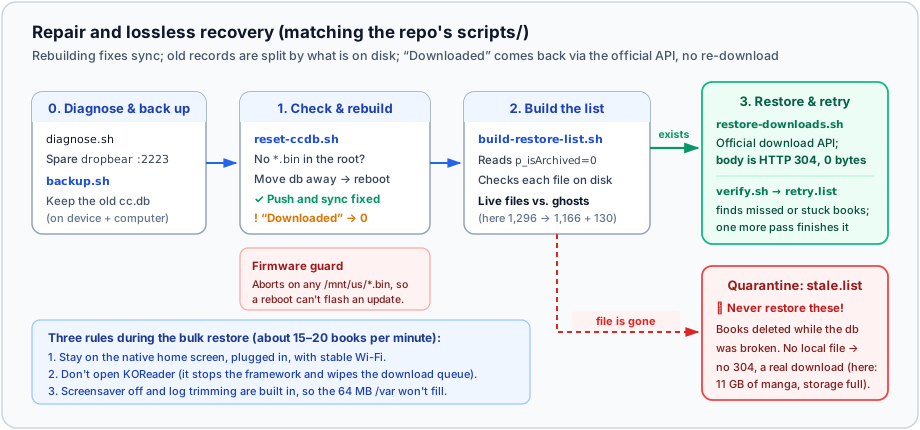
Copy scripts/ onto the Kindle (for example to /mnt/us/ccdb-repair/scripts/). On macOS, OpenMTP or Android File Transfer will do. Don’t use libmtp’s mtp-detect: it probes every device property one by one, and both times the Agent tried it, it knocked the Kindle out of MTP mode.
Prep: an SSH session that survives leaving KOReader
KOReader’s built-in SSH (port 2222) lives and dies with KOReader. But the sync and bulk restore below must happen in the native UI, because KOReader stops the native framework when it starts. The workaround: connect to 2222 first, then use KOReader’s bundled dropbear to start a second server on port 2223:
cd /mnt/us/koreader && setsid ./dropbear -E -R -s -p 2223 -P /tmp/dropbear_2223.pidIt only accepts public-key login and reads settings/SSH/authorized_keys from the same directory. Once it’s up, exit KOReader to the native home screen and reconnect on 2223. Everything below runs as root.
Step 0: diagnose and back up
sh scripts/diagnose.sh
sh scripts/backup.sh
backup.sh backs up both databases to /mnt/us/ccdb-repair/backup-<timestamp>/. Copy that directory to your computer as well before continuing. This isn’t just insurance: recovering “Downloaded” later needs the old cc.db, which is the only place that still remembers which books you had downloaded.
Step 1: rebuild
sh scripts/reset-ccdb.sh⚠️ Before rebooting, there must be no
*.binfirmware package in the root of/mnt/us/. The script checks and refuses to run if it finds one; it also refuses if no backup has been made.
The script moves cc.db aside and reboots. After boot and Wi-Fi, your cloud titles gradually come back into the library. At this point, send yourself a new document, sync your progress, long-press a book and check the menu: the original problem is already fixed.
Then you’ll notice that “Downloaded” shows 0.
The files are all still there. Look in /mnt/us/documents/Downloads/Items01/: not a single .kfx book or .sdr folder is missing; on mine that’s about 7,800 files. It shows 0 for two reasons: deleting cc.db also propagated a wipe of the download state into the new library, turning everything into NOT_DOWNLOADED; and scanner, which indexes local files, ignores the Downloads/ directory, so a full scan reports fullscan:OK:add=0. Files there are registered exactly once, at the moment a download completes. However long you wait, they won’t come back on their own.
Step 2: build the list from the old database
sh scripts/build-restore-list.sh /mnt/us/ccdb-repair/backup-XXXX/cc.dbIt takes every entry marked as downloaded in the old database and checks whether each file still exists. Those that do go into restore.list; those that don’t go into stale.list. Don’t restore the latter; see below for why.
Step 3: bulk restore, verify, fill the gaps
# Calls the official download API in bulk in the background; keeps running if SSH disconnects
setsid sh scripts/restore-downloads.sh </dev/null >/dev/null 2>&1 &
tail -f /mnt/us/ccdb-repair/restore.log
This step doesn’t modify any database. It calls the same interface that sits behind the “Download” button in the library:
echo '{ kppItems = "CDEKEY,PDOC;CDEKEY2,PDOC" }' | lipc-hash-prop com.lab126.readnow kppDownloadActionWhen the file is already on the device, here’s what that call does internally:
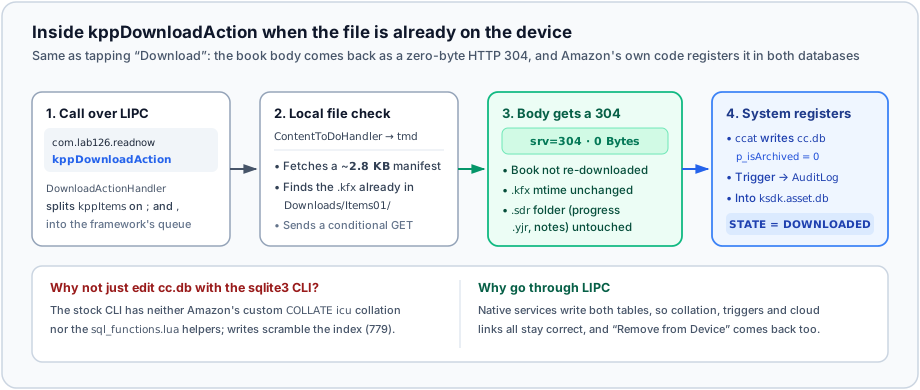
Each book only re-fetches a manifest of about 2.8 KB. When it comes to the book content itself, the server returns HTTP 304 Not Modified and transfers 0 bytes. The local .kfx keeps its modification time, and the reading progress and annotations in the adjacent .sdr folder stay as they were. Finally, ccat itself writes the download record into cc.db, which then syncs to the new library.
On my device it ran at 15 to 20 books per minute, so a thousand books take about an hour. Keep three things in mind while it runs:
- Stay on the native home screen, plugged in, with Wi-Fi connected.
- Don’t open KOReader. The download queue lives in the native framework’s memory; once the framework stops, the queue is gone.
- The script temporarily disables the screensaver and empties
/var/log/messageswhen it grows too large, so the 64 MB/vardoesn’t fill up.
When it’s done, verify, and resubmit anything that wasn’t registered or got stuck in “downloading”:
sh scripts/verify.sh
rm /mnt/us/ccdb-repair/restore.offset
setsid sh scripts/restore-downloads.sh /mnt/us/ccdb-repair/retry.list </dev/null >/dev/null 2>&1 &
Three things not to do
- Don’t restore
stale.list. These entries are marked as downloaded in the old database, but the files are gone. They aren’t lost files: they’re books you deleted yourself while the database was broken. The file was deleted, the record wasn’t. Submit them and, with no local file, there’s no304, so the Kindle will dutifully download them all from the cloud again. - Don’t modify
cc.dbwith thesqlite3CLI. The indexes on theEntriestable use a customCOLLATE icu, and the triggers call Lua functions insideccat; the CLI has neither. Writes won’t error out, but the indexes will be scrambled. To check progress, open read-only, and don’t copy the database to/tmpeither:sqlite3 "file:/var/local/ksdk.asset.db?mode=ro" "select DOWNLOAD_STATE,count(*) from Nodes group by 1;" - Don’t paste the output of
lipc-probe -v com.lab126.kppkafanywhere. It prints your Amazon access token in plain text.
One more note: the Agent also decompiled DeleteItemHandler and found that the call to remove a local download is echo '{ kppCdeKey = "CDEKEY", kppCdeType = "PDOC" }' | lipc-hash-prop com.lab126.readnow kppDeleteItemAction; as long as you don’t pass kppFrom = "cloud", it won’t hit the branch that revokes cloud samples. I have never actually run this command, so try it on a single book first if you need it. More details are in the repo’s docs/how-it-works.md.
3. That night
Written out, the previous section is four steps. In reality it took from a little after 10 p.m. to 3 a.m.
1. Checking the network first
My reading is split in two: EPUBs go through KOReader, and personal documents pushed to the device go through the native system. A few months ago the native side started acting up. Searching r/kindle for sync issues turned up a long list of recent help requests, such as my kindle isn’t syncing! someone help me? and Usually syncs only one way. In the comments under Bookfere’s firmware update post, someone said that after updating, no book would open and they all showed as deleted, yet the files were still in storage; someone else said all their books and dictionaries had vanished, “Manual Delete” showed nothing, and the space was still taken.
I can’t tell whether these people had the same cause as me. But after reading all that, I accepted that “this is Amazon’s problem” and put up with it for months.
So the first thing I told the Agent that night was:
It doesn’t sync on my home Wi-Fi, but seems fine on my phone’s hotspot; on the same Wi-Fi, the Kindle app on my phone works normally.
Anyone hearing that would check the network. And my home network was genuinely worth checking: the soft router runs a proxy, ad blocking with 350,000 rules, and both software and hardware flow offloading.
The Agent ruled things out one by one on the router. The Kindle wasn’t on the proxy list; its traffic went out directly. The ad-block lists contained a whole swath of amazon domains, but the few Kindle sync uses (todo-ta-g7g, cde-ta-g7g, det-ta-g7g, kindle-digital-delivery) had long been whitelisted. I had added them myself months earlier, for this very sync problem. Added, no effect. Now I know why.
Then came packet capture. The Agent captured on the br-lan bridge and saw something very convincing: every connection completed the TCP handshake, then the client never sent a TLS ClientHello, and 12 seconds later the server sent a FIN. It looked for all the world like TLS was being blocked by something.
In fact, it was capturing in the wrong place:
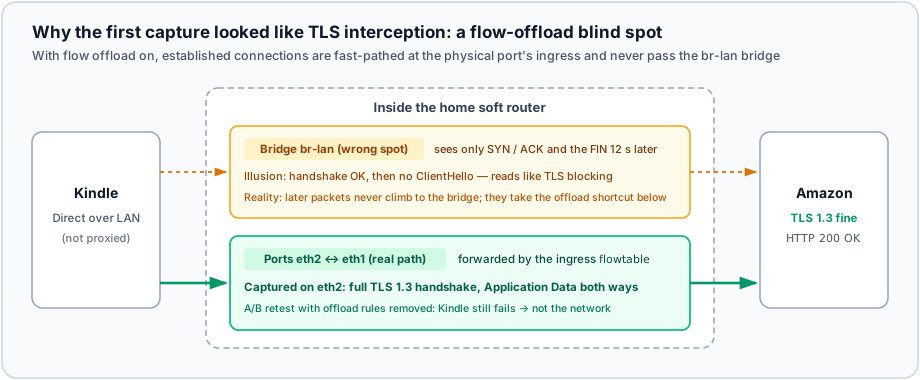
The router had flow offloading on, with a flowtable attached to the ingress of the physical ports. Once a connection is established, subsequent packets are forwarded directly between the two physical ports and no longer pass through br-lan. On the bridge you only see the first and last few packets. The data in between wasn’t missing; it just didn’t go through there.
Without reloading the firewall, the Agent temporarily removed the offload rules and recaptured on the physical port eth2. This time the TLS 1.3 handshake was complete, data flowed normally in both directions, and the Kindle still failed to sync.
At that point it was certain that the home network was fine. The conclusion was correct; it just didn’t do much for fixing the Kindle. As for “seems fine on the hotspot”, that can’t be retested anymore. Database write failures don’t care which network you’re on, so it was most likely just an impression of mine.
2. The logs
The only way forward was into the device. I used OpenMTP to put my public key into koreader/settings/SSH/authorized_keys (before which the Agent had used mtp-detect to knock the Kindle out of MTP mode twice) and connected on 2222.
The first thing in /var/log/messages was another red herring: the download service tmd had a series of srv=403s from AmazonS3. Lining up the timestamps, these requests had been queued at 23:03 and only sent when Wi-Fi connected at 23:10, by which time the pre-signed URLs had expired.
After another sync, the 403s were gone, and what remained were the 398 SQL logic errors quoted in section 1. Only then did I casually mention, “oh, and downloaded personal documents only offer Delete Permanently on long-press”, which matched the logs exactly: the documents couldn’t be registered as cloud entries, so the system could only treat them as local files.
The Agent tried to dig down to the exact SQL that was failing. Using KOReader’s bundled LuaJIT and ljsqlite3, it stubbed out those Lua functions on a copy of the database, supplied a byte-comparing icu collation, and replayed the failing DELETE. The result was database disk image is malformed (779, SQLITE_CORRUPT_INDEX), which went away after REINDEX. In other words, that “corruption” was an artifact of the test collation differing from the Kindle’s; the trigger chain itself was fine. As for what actually triggered the SQL logic error on the real device, ccat only logged a generic error description, and the real cause was never recorded.
At 11:30 p.m. we decided to stop digging: back up cc.db, delete it, reboot.
3. The reboot, and an unplanned upgrade
What came back after the reboot wasn’t the library. It was a firmware update.
Earlier that evening I had planned to upgrade the firmware to 5.20.1 and re-jailbreak, so I copied the update package into the Kindle’s root directory. Only then did I discover that a jailbroken Kindle has no “Update Your Kindle” option in settings at all: to block updates, Véra renames /usr/bin/otaupd and otav3. I gave up on the upgrade and left the file where it was.
The Agent didn’t check /mnt/us/ before reboot, and I didn’t think to remind it. So the upgrade happened after all, just a little later than originally planned.
The firmware was now 5.20.1; the jailbreak was gone, and with it the OTA block. In the twenty-odd minutes I spent in the native UI waiting for the library to sync, it quietly updated itself again to 5.20.1.0.2.
Véra’s guide didn’t list that version. I ran the procedure again anyway, and it worked.
Back on SSH: zero SQL logic errors, zero ProcessArchiveItemFailed, OTA blocking back in effect. New documents appeared, progress synced, and “Remove from Device” was back in the long-press menu. A problem that had lasted months ended right there.
4. “Downloaded” drops to zero
Then I glanced at “Downloaded”: 0 books.
The files for over a thousand books were on the device, and the library didn’t recognize them. I said maybe I should just factory reset. The Agent pointed out that a reset would also lose the download state, and take the files with it, so it could only make things worse.
How do you get the new database to reclaim these files? Tapping “Download” by hand worked, so the Agent had me tap one book as a sample while it watched the logs in the background. Two findings:
- Tapping “Download” ultimately calls the LIPC property
kppDownloadActiononcom.lab126.readnow. - The sample’s content request returned
srv=304, 0 bytes. The local.kfxstill had its October 3 modification time; the whole thing only re-fetched a 2.8 KB manifest.
The Agent pulled DownloadActionHandler out of /opt/amazon/ebook/lib/EInkReadNowService.jar, decompiled it with javap, and confirmed the parameter format is cdeKey,cdeType;.... A test with one book registered successfully. The old database had 1,296 entries marked as downloaded; in batches of 20 books, 45 seconds apart, it started running in the background.
5. Three more things went wrong
The RAM disk filled up. The Kindle’s /var is a 64 MB RAM disk, and /tmp lives inside it. During the bulk download, /var/log/messages grew by about 4 MB per minute and reached 48 MB in 11 minutes. On top of that, the Agent had copied the database into /tmp to check progress, and /var hit 100%. The fix: empty the log, add a watchdog loop that empties it whenever it exceeds 12 MB, and switch progress checks to opening the database read-only in place.
While cleaning up background processes, the Agent used pkill -f and ps | grep, and the match pattern happened to appear in its own SSH command line too. It killed its own session three times before switching to PID files. In the middle of that, it also reran an old version of the restore script, which overwrote the to-do list it had just cleaned up.
I opened KOReader. Halfway through, I opened KOReader. The native framework stopped, the download queue vanished with it, the SSH on 2223 dropped, and 126 records were left stuck in DOWNLOADING in the new library. Back in the native UI, we restarted SSH, computed “old database list minus what’s already registered”, added the stuck entries, and resubmitted 182 and then 49 books in two rounds. That’s where note 2 in the previous section comes from.
11 GB of manga. While resubmitting, I noticed the storage was full.
Everything being downloaded was manga, and manga I had deleted long ago.
Of those 1,296 records, the files still existed for 1,166; for the other 130, the files were gone. The Agent had actually noticed this when building the list, but interpreted it as “the files were lost and need to be downloaded again” and submitted them too. The truth: during the months cc.db was broken, whenever I deleted a book in the UI, the file was deleted but the database update failed, so these 130 “Downloaded” records lingered in the old database. With no local file, there was no 304, and the system obediently downloaded about 11 GB.
I deleted that batch by hand in the native UI. That also served as a check: after deleting 12 of them, the files disappeared, the database records updated accordingly, and there were no SQL errors. Deletion works in the new database too.
The tally when I called it a night at 3 a.m.:
| Before | At the end | |
|---|---|---|
SQL logic errors per sync | 398 (36 deletes + 362 inserts) | 0 |
| ”Downloaded” recovered | — | 1,166 books (DOWNLOADED=1189 in the new library overall) |
| Content re-downloaded to recover them | — | None (HTTP 304, only KB-sized manifests) |
| Restored when they shouldn’t have been | 130 stale records in the old database | ~11 GB actually downloaded; 13.3 GB free after manual cleanup |
| Firmware | 5.19.6 | 5.20.1.0.2 (without my consent) |
At the end, about 19 books were still stuck in DOWNLOADING, mostly from that interrupted batch of manga. I left them alone.
4. Lessons, and open questions
- If you can read the device’s own logs, read them first. A packet capture can prove the data reached the device; it can’t prove the device handled it correctly. The half hour on the router fully ruled out the network and, along the way, revealed the capture blind spot under flow offloading, so it wasn’t wasted. But if I had looked at
/var/log/messagesfirst, ten minutes would have been enough. - “It seems fine on another network” needs retesting. A local SQLite error doesn’t care whether you’re on Wi-Fi or a hotspot. I passed an unverified impression to the Agent as fact, and that’s what set the direction for the first half of the night.
- Similar-sounding complaints can have completely different causes. Seeing people everywhere say sync was broken, I assumed it was a server-side problem everyone shared. I don’t have logs from other people’s devices, so I can’t judge theirs. But on mine, the problem was entirely local, and fixable. I came very close to replacing my entire reading setup over a file that could simply be deleted and rebuilt.
- A broken database’s records can’t be trusted either. The old database didn’t just fail to record new books; it also failed to record what I had deleted. “Marked as downloaded, but the file is gone” is a very clear signal, and we saw it and misread it. The current
build-restore-list.shquarantines such entries separately. - If there’s an official code path, don’t hand-edit the database. The soundest decision that night was not touching
cc.db, but findingkppDownloadActionand letting the system write it itself. Slower, but what gets written is exactly what normal use would write. - Letting an Agent operate a real device requires backups and small, verified steps. Working out how the two libraries relate, decompiling the interface parameters out of a jar, discovering the
304path: doing that myself would probably have taken a few weekends. It also failed to check the root directory before rebooting, copied a database into a 64 MB RAM disk, took stale records for books to restore, and killed its own session three times. I could let it run because there were two backups before anything happened, every bulk operation was tried on a single book first, and I was watching the whole time. In the end it was me who recognized where those 130 books came from.
Two questions remain unanswered:
- How
cc.dbbroke in the first place. It might be related to the dual-write migration between the old and new libraries introduced in5.19, to concurrent writes between the two databases (database is lockedshows up 3 times in the logs), or to third-party plugins that write entries into the library. These are all guesses without evidence. Rebuilding the database solved the current problem; I don’t know whether it will come back. - Whether it really worked on the hotspot. The database has been rebuilt, so there’s no way to verify anymore.
If your Kindle shows the same change.lua / SQL logic error logs, and especially if you’ve pinned down the actual cause, issues are welcome at t0saki/kindle-cc-db-repair.
References
- Repair scripts and technical notes: https://github.com/t0saki/kindle-cc-db-repair
- Kindle Modding Wiki: https://kindlemodding.org/ (pick a method by model and firmware: Jailbreaking Wizard)
- Véra jailbreak: https://kindlemodding.org/jailbreaking/Vera/
- Installing KOReader after jailbreaking: https://kindlemodding.org/jailbreaking/whats-next/getting-koreader/
- Bookfere’s post on firmware 5.18.5.0.1 (in Chinese), whose comments include reports of “files still there, library doesn’t recognize them”: https://bookfere.com/post/1172.html
- Posts on r/kindle with similar symptoms (not sure if the same cause): my kindle isn’t syncing! someone help me?, Usually syncs only one way